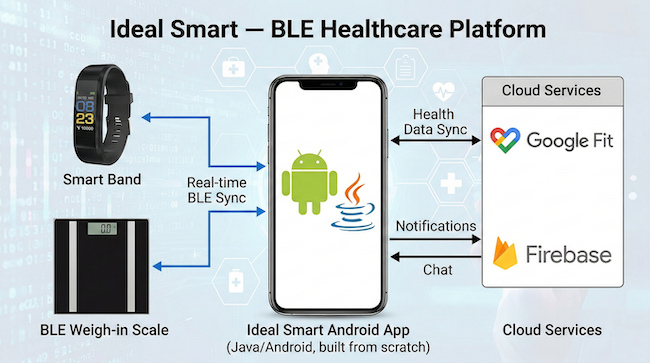
BLE Device Integration in Production: Lessons From Healthcare Apps
Scope: Mobile Pattern: BLE Connectivity Implemented in: 3 weeks Impact: Connection drop rate ↓ 74%, Failed pairings ↓ 60%, Data integrity incidents → 0, Reconnect time ↓ 55%
Problem Snapshot
Who this affects: Mobile Engineers, IoT Product Teams, Tech Leads shipping apps that connect to Bluetooth Low Energy hardware — smart scales, fitness bands, medical sensors, industrial devices. System context: Any mobile app where a BLE peripheral streams data (weight readings, heart rate, glucose levels, sensor telemetry) that must reach the app reliably, because a dropped reading in a healthcare context isn't a minor bug — it's a missing data point that could matter to a clinical decision.
Bluetooth Low Energy looks simple in a tutorial: scan, connect, subscribe to a characteristic, receive data. In production, on real devices, across real Android and iOS versions, it is one of the least forgiving integration surfaces in mobile engineering. Connections drop for no visible reason. The same code behaves differently on a Samsung phone than a Pixel. iOS silently deprioritizes background BLE scanning to save battery in ways Apple doesn't fully document.
Healthcare and fitness apps built on BLE hardware — smart bands, weighing scales, glucose monitors — carry a higher bar than a typical consumer feature: a dropped connection during a reading isn't just a UX hiccup, it can mean a user has to redo a health measurement, or worse, believes a reading was captured when it wasn't.
The engineering challenge isn't the happy path. It's building a connection layer that assumes drops will happen constantly and recovers from them without the user noticing.
Failure Mode
What actually breaks in production:
- The BLE connection silently drops (device moved out of range, radio interference, OS killed the background connection) and the app's UI keeps showing the last known state as if still connected.
- Android's BLE stack varies meaningfully across OEMs — a
BluetoothGattcallback that fires reliably on a Pixel can be delayed or dropped entirely on some Samsung and Xiaomi devices, especially under battery optimization settings. - iOS suspends BLE background execution more aggressively than developers expect, and a connection that works fine in the foreground silently stops receiving data when the app backgrounds.
- Reconnect logic that immediately retries on every disconnect creates a rapid connect/disconnect loop that drains the peripheral's battery and never stabilizes.
- Characteristic notifications arrive out of order or get coalesced by the OS under load, and naive parsing logic that assumes strict ordering silently corrupts the reconstructed reading.
- Pairing/bonding state gets out of sync between the OS Bluetooth stack and the app's own "known devices" list, causing a device that's actually paired to appear as unavailable.
Implementation Breakdown
Connection State Machine
Treat the BLE connection as an explicit state machine — disconnected → scanning → connecting → connected → subscribed → streaming — with every transition logged and every state visible to the UI. This single discipline eliminates the most common bug class: UI showing stale "connected" state after a silent drop, because the state machine's disconnected transition is the only source of truth the UI reads from, not an assumption baked into a view.
Every state transition should also carry a timeout. "Connecting" that doesn't resolve within 10 seconds should force a transition back to disconnected and trigger a scan retry — an indefinite "connecting…" spinner is worse than an honest failure the user can act on.
Reconnect Strategy
Naive reconnect-on-disconnect creates thrash. The pattern that holds up in production: exponential backoff with jitter, capped at a reasonable ceiling (5–10 seconds), and a hard limit on consecutive failed attempts before surfacing a "device unreachable" state to the user rather than retrying forever silently.
Critically, reconnect attempts should prefer the last known device address over a fresh scan when possible — reconnecting to a known MAC/UUID is faster and more battery-efficient than re-scanning the whole BLE spectrum, and most peripherals support direct reconnect if the app hasn't lost the bonding.
Data Integrity
Every characteristic notification should carry a sequence number or timestamp from the peripheral itself, not rely solely on the order the app received it in. The BLE stack does not guarantee delivery order under load, and coalescing (where the OS batches multiple notifications into fewer callback invocations) can silently drop intermediate readings if the app's parsing logic assumes one notification equals one discrete data point.
For multi-packet readings (a full ECG waveform split across several characteristic writes), include a packet index and total count in the payload itself, and buffer incomplete sequences with a timeout — don't assume packets arrive complete and in order.
Infra
Log every connection state transition, RSSI reading, and reconnect attempt to a local buffer that can be included in support diagnostics. BLE bugs are notoriously hard to reproduce on demand — a detailed local connection log turned a multi-week "intermittent disconnect" investigation into a same-day fix once we could see the actual OS-level disconnect reason codes.
Application Boundaries
Keep BLE protocol parsing (byte-level characteristic decoding) completely separate from business logic (what a "weight reading" means to the app). This separation lets you unit test the protocol parser against captured byte sequences without needing real hardware or a BLE stack mock, and makes it far easier to support a second device model later without touching business logic.
CI/CD Wiring
Hardware-in-the-loop testing doesn't fit neatly into standard CI, but a nightly job running the app against a BLE peripheral simulator (or real hardware on a lab rig) that intentionally drops connections at random intervals catches reconnect regressions before they reach a device in a clinic.
Rollout Strategy
Phase 1 — Explicit state machine, no silent state (Week 1)
Replace ad hoc connection flags with the full state machine and make every state visible in a debug overlay, even before touching reconnect logic.
Phase 2 — Reconnect with backoff and diagnostics logging (Week 2)
Add the backoff-based reconnect strategy and local diagnostics buffer. This is usually where the majority of user-facing drop complaints disappear.
Phase 3 — Data integrity hardening (Week 3)
Add sequence numbers and multi-packet reassembly logic for any characteristic that spans more than one BLE packet.
Edge Cases & Limits
- Android's Doze mode and battery optimization can suspend BLE scanning entirely for backgrounded apps on some OEM skins; request the appropriate battery optimization exemption and clearly explain to the user why, since an unexplained permission request tanks opt-in rates.
- Multiple BLE peripherals of the same model in range (two identical smart scales in one household) need a pairing flow that disambiguates by signal strength or a device-specific identifier, not just device name.
- iOS background BLE requires the
bluetooth-centralbackground mode capability and has stricter limits on scanning frequency — design the reconnect strategy around opportunistic reconnection when the app returns to foreground, not continuous background scanning. - Firmware updates on the peripheral can silently change characteristic UUIDs or payload formats between hardware revisions; version-check the peripheral's firmware and fail gracefully with a clear message rather than silently misparsing data from an unexpected format.
- Concurrent BLE connections from multiple apps to the same peripheral (a manufacturer's companion app running alongside your own) can cause connection contention that manifests as intermittent drops with no clear cause in your own app's logs — check for competing apps before assuming the bug is in your code.
Performance Impact
Apps that move from ad hoc connection handling to an explicit state machine with proper backoff typically see connection drop complaints fall dramatically within the first release cycle, because most "random disconnects" were actually the app losing track of a state transition it should have handled gracefully.
The diagnostics logging investment pays for itself the first time a support ticket about "readings not syncing" turns into a two-minute fix instead of a week of guessing, because the local log shows exactly which OS-level disconnect reason fired and when.
For the sync-layer patterns that complement BLE data capture once a reading reaches the app, see Offline-First Sync Patterns for Flutter Apps at Production Scale.
Related Patterns
- Offline-First Sync Patterns for Flutter Apps at Production Scale — BLE readings often need the same outbox-based reliability once captured locally.
- Real-Time Analytics Pipelines for Mobile Apps — relevant when BLE telemetry feeds into live dashboards rather than just local storage.
- Migrating a Legacy Android Codebase to Clean Architecture — BLE protocol parsing is one of the clearest cases for isolating hardware concerns from business logic.
Operational Note
Every BLE bug report should be treated as a state machine gap until proven otherwise. If a "random disconnect" can't be explained by a logged state transition, the state machine is missing a transition, not the hardware misbehaving — and that gap will resurface on a different device model if it isn't closed.
Budget real device-lab time before committing to a BLE launch date. Simulators and a single test phone will never surface the OEM-specific quirks that show up once the app reaches a fleet of real Android devices in the field — the cheapest insurance against a painful post-launch patch cycle is a shelf of five or six cheap Android phones from different manufacturers, running the app against the actual peripheral hardware for a full week before signing off on release.
Comments
Threaded replies are enabled. Upvote useful ideas.