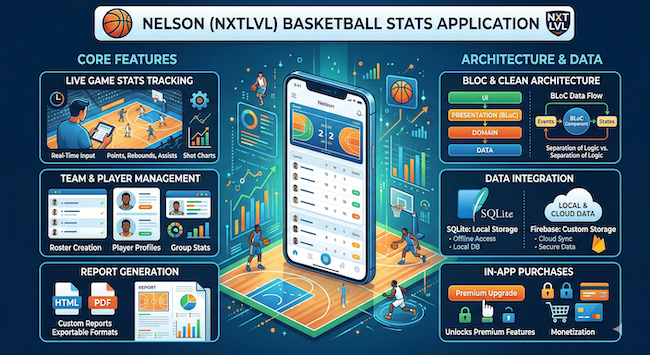
Real-Time Analytics for Mobile Apps: Event Ingestion Patterns
Scope: Mobile Pattern: Event Ingestion Implemented in: 3 weeks Impact: Dashboard latency ↓ from minutes to seconds, Battery impact of tracking ↓ 45%, Event loss rate → near 0, Backend ingestion cost ↓ 30%
Problem Snapshot
Who this affects: Mobile Engineers, Data Engineers, Product Teams building apps where users expect live, up-to-the-second data — sports stats, trading, live event tracking, activity monitoring. System context: Any mobile app where analytics or user-generated events need to reach a dashboard or another user's screen within seconds, not the batch-processed hours-later latency that standard analytics SDKs are built for.
Most mobile analytics integrations (Firebase Analytics, Mixpanel, Amplitude) are built for aggregate reporting, not live dashboards — events batch, upload periodically, and process asynchronously on a timeline of minutes to hours. That's the right trade-off for product analytics. It's the wrong architecture entirely for a feature where the product promise is "see this update live."
Building genuinely real-time analytics — a live sports stats feed, a trading dashboard, a fitness app showing a friend's live activity — requires a different pipeline: low-latency event ingestion, offline-safe buffering so a spotty connection doesn't lose data, and a backend that can fan out updates to subscribed dashboards within a second or two of the event occurring.
The engineering tension is real: true real-time delivery costs more in battery, bandwidth, and backend infrastructure than batched analytics. The discipline is being selective about which events actually need real-time treatment, and architecting the rest as standard batched analytics.
Failure Mode
What actually breaks when teams bolt real-time requirements onto a standard analytics SDK:
- Standard analytics SDKs batch and upload on their own schedule (often 30+ seconds or on app background), which is far too slow for a feature promising live updates.
- Naive "send every event immediately" implementations drain battery fast by keeping the radio active continuously instead of batching intelligently.
- Events generated while offline get silently dropped instead of queued, because the SDK wasn't designed with an offline-first event buffer in mind.
- The backend ingestion endpoint isn't built for the write volume real-time event streams generate, and it falls over or throttles under load exactly when the live feature is most in demand (a popular live event, a busy trading session).
- Dashboard consumers poll the backend on a fixed interval instead of subscribing to push updates, adding unnecessary latency and backend load simultaneously.
- No distinction is made between events that genuinely need sub-second delivery and events that can tolerate minutes of delay, so everything gets the expensive real-time treatment even when most of it doesn't need it.
Implementation Breakdown
Event Classification
Before building any pipeline, classify every event type by required freshness: true real-time (sub-second, needs a live subscription — a live score update), near-real-time (a few seconds to a minute is fine, a lightweight push-based sync works), and batch (standard analytics, existing SDKs handle this well). Most apps overestimate how many event types genuinely need the first tier — a live sports app might have only "score changed" and "match started" as true real-time events, with everything else (page views, button taps) staying on standard batched analytics.
Client-Side Event Buffer
For events needing real-time or near-real-time delivery, maintain a local buffer (a lightweight SQLite table, not just an in-memory queue that dies on app kill) that persists events immediately on capture, independent of network state. A background sender drains this buffer opportunistically — batching small groups of events for efficiency when connectivity is good, and holding them safely when offline, exactly the outbox pattern used for offline-first data sync more broadly.
Low-Latency Ingestion Endpoint
The backend ingestion path for real-time events should be a lightweight, purpose-built endpoint — not routed through the same heavier application logic as standard API requests. Accept the event, write it to a fast append-only store (a Redis stream or a dedicated time-series table), and acknowledge immediately; downstream processing (aggregation, dashboard fan-out) happens asynchronously from a consumer of that stream, decoupled from the ingestion request's response time.
Push-Based Dashboard Delivery
Dashboards subscribed to live data should receive updates via WebSocket or Server-Sent Events, not polling. A polling dashboard checking every 5 seconds either feels laggy (if the interval is long) or hammers the backend unnecessarily (if it's short) — a push-based subscription delivers updates the moment they're available with far less aggregate backend load, since the server only sends data when something actually changed.
Infra
Redis Streams or a similarly lightweight pub/sub layer sits between the ingestion endpoint and the fan-out layer that pushes to connected dashboard clients. This decoupling means a spike in event ingestion doesn't directly translate into a spike in WebSocket message pressure — the fan-out layer can apply its own batching or throttling logic independently of how fast events are arriving.
Application Boundaries
Keep the real-time event pipeline architecturally separate from standard product analytics, even if some event types theoretically overlap. Trying to force one pipeline to serve both the "aggregate over 30 days" use case and the "deliver within 500ms" use case usually produces a system that's mediocre at both, versus two purpose-built, simpler pipelines that each do one job well.
CI/CD Wiring
Load-test the ingestion endpoint against realistic burst patterns before a known high-traffic event (a major sports match, a product launch) — real-time systems fail differently under load than batch systems, with latency degrading gradually rather than the endpoint failing outright, which makes load testing more important, not less, than for a standard API.
Rollout Strategy
Phase 1 — Classify events and build the client-side buffer (Week 1)
Audit existing event types by required freshness, and build the persistent local buffer for events that need real-time or near-real-time treatment.
Phase 2 — Lightweight ingestion endpoint (Week 2)
Stand up the purpose-built, low-latency ingestion path separate from standard API infrastructure, backed by a fast append-only store.
Phase 3 — Push-based dashboard delivery (Week 3)
Replace any polling-based dashboard consumers with WebSocket or SSE subscriptions, and load-test the full pipeline against realistic burst scenarios.
Edge Cases & Limits
- Very high-frequency events (continuous sensor data, not discrete occurrences) may need client-side downsampling before they even reach the buffer — sending every individual reading defeats the purpose of a lightweight pipeline.
- Multi-device consistency (a user viewing the same live dashboard on two devices) needs the fan-out layer to guarantee ordered delivery per subscriber, or the two devices can show contradictory states momentarily.
- WebSocket connections at scale need careful connection pool management on the backend — a naive implementation that spawns unbounded connections per dashboard subscriber doesn't scale past a few thousand concurrent viewers without dedicated infrastructure planning.
- Real-time delivery guarantees ("at least once" vs. "exactly once") need to be explicit and tested — a naive at-most-once pipeline that silently drops events under backend pressure is far worse for a live feature's credibility than slightly delayed but complete data.
- Time zone and clock skew handling matters more than teams expect for "live" features spanning users in different regions; always timestamp events server-side on receipt in addition to any client-provided timestamp, and use the server timestamp as the ordering authority for dashboard display.
Performance Impact
Apps that separate true real-time events from standard batched analytics typically see dramatic reductions in both battery impact and backend cost, because the expensive low-latency treatment only applies to the small subset of events that genuinely need it — the majority of analytics volume stays on efficient, well-understood batched infrastructure.
Dashboard-perceived latency improves from the tens-of-seconds range typical of polling-based implementations down to sub-second with a properly built push-based pipeline, which is often the difference between a "live" feature that feels genuinely live and one that feels sluggish despite technically updating in real time.
For the client-side buffering pattern this pipeline builds on, see Offline-First Sync Patterns for Flutter Apps at Production Scale.
Related Patterns
- Offline-First Sync Patterns for Flutter Apps at Production Scale — the persistent local buffer pattern used here is a direct application of offline-first sync principles to analytics events.
- BLE Device Integration in Production — BLE telemetry is a common real-world source of the high-frequency sensor data discussed in the edge cases above.
- Self-Hosted AI Infrastructure on a Single Node — the Redis-backed ingestion and fan-out layer described here maps directly onto the queue-based decoupling pattern covered in that piece.
Operational Note
Resist the temptation to make everything real-time once the infrastructure exists to support it. The event classification exercise from Phase 1 should be revisited whenever a new feature is proposed — the discipline of asking "does this actually need sub-second delivery" is what keeps the real-time pipeline lean and reliable instead of becoming the default, expensive path for every event type in the app.
The teams that get the most value from a real-time pipeline are the ones who treat "real-time" as a scarce, carefully allocated resource rather than a default setting. Every event type added to the fast path adds ongoing infrastructure cost and battery burden across the entire install base, whether or not any individual user notices the difference between a one-second and a thirty-second delay for that particular data point.
Comments
Threaded replies are enabled. Upvote useful ideas.